Volunteer training
Knocking Doors for Mike
How to use the i360 Grassroots app, one simple step at a time
Watch first
The whole app in 80 seconds
Sit back and watch. We'll walk through each step next.
Mike Minogue for Governor · Door Knocking Training
What we'll cover
Four simple parts
1
Get the app
Download it on your phone
2
Get your login
From your RPD or Alyssa
3
Knock doors
What to tap at every house
4
Get help
Who to call if you're stuck
Mike Minogue for Governor · Door Knocking Training
Part 1 · Get the app
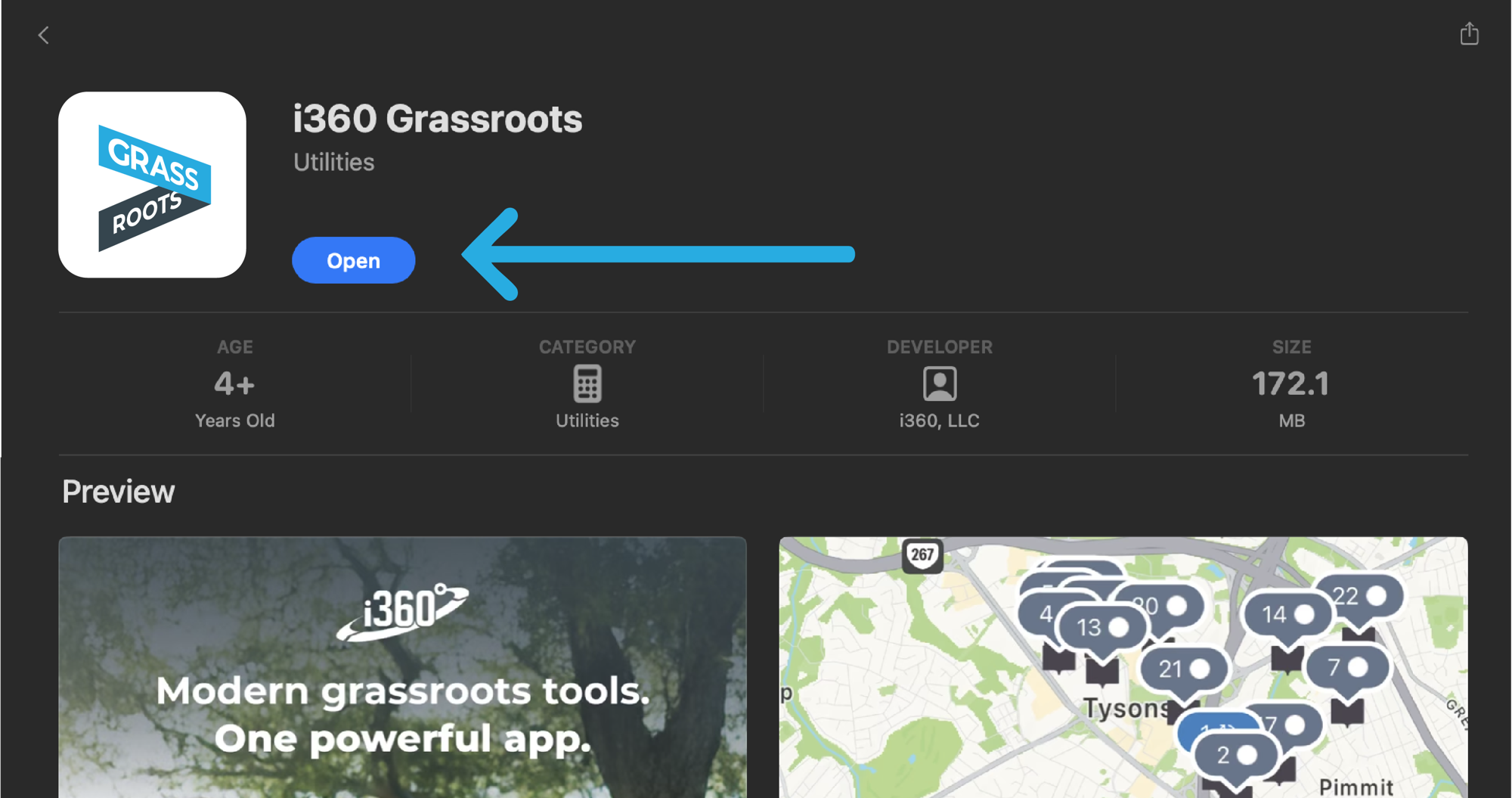
Download i360 Grassroots
1
Open the App Store (iPhone) or Google Play (Android)
2
Search i360 Grassroots
3
Tap Get or Install
4
When it finishes, tap Open
Mike Minogue for Governor · Door Knocking Training
Part 2 · Get your login
Get your login
1
To get started, contact your Regional Political Director (RPD)
2
Tell them your name, email, and town
3
They set up your account and assign your town
4
They let you know when you're ready to log in
No login yet? That's completely normal. This training shows you how the app works.
Your point of contact
Your RPD
Regional Political Director
Find yours at the end
Mike Minogue for Governor · Door Knocking Training
Part 2 · Log in
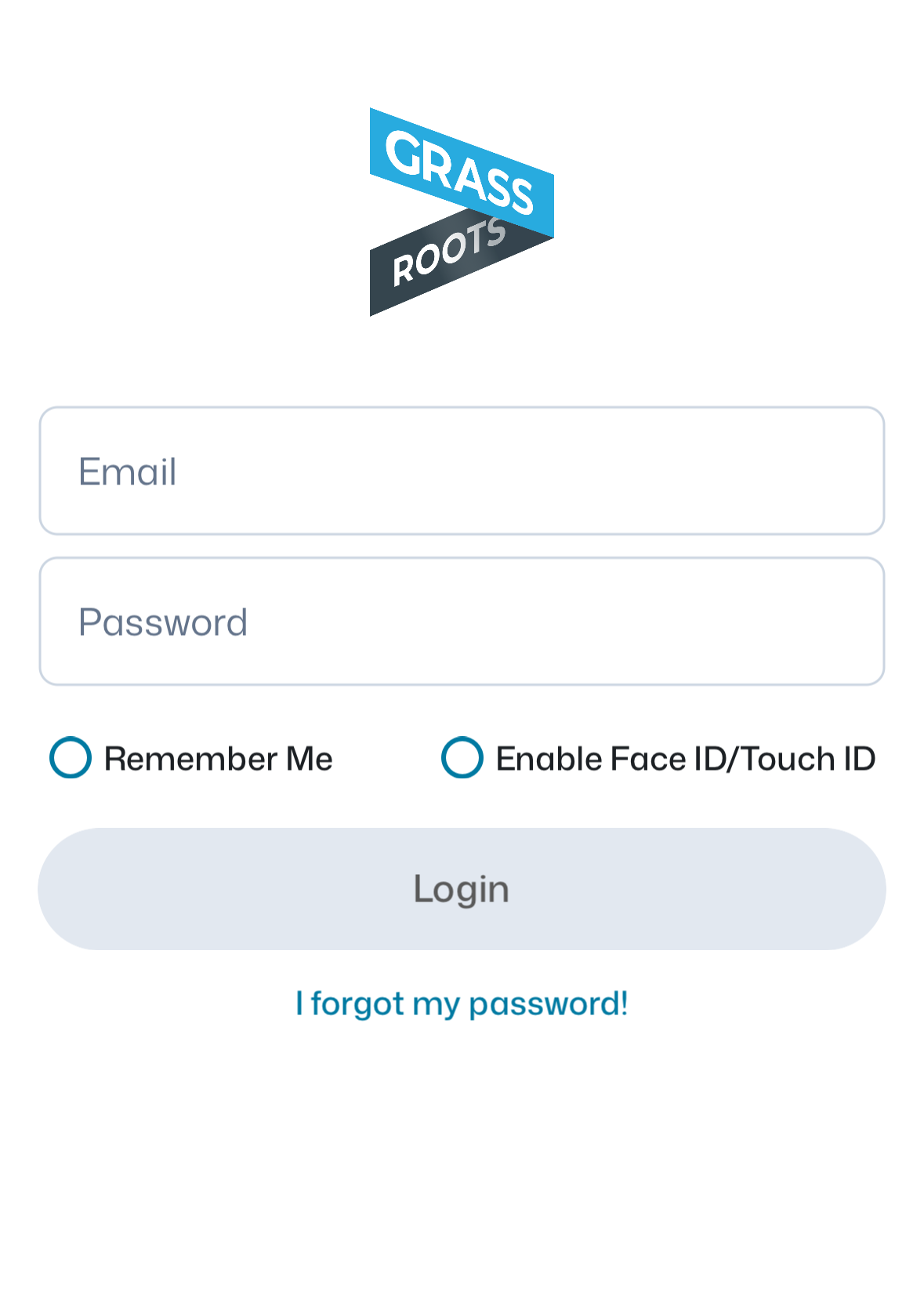
How to log in
1
Username: the email you gave your RPD
2
Password: NewGovernor (capital N and G)
3
Tap Remember Me so you only do this once
4
Tap Login
5
Tap [Your Town] General Election Canvass, then Agree
Not working, or a blank screen? Your account or town may not be ready yet. Your RPD is happy to help.
Mike Minogue for Governor · Door Knocking Training
Part 3 · Knock doors
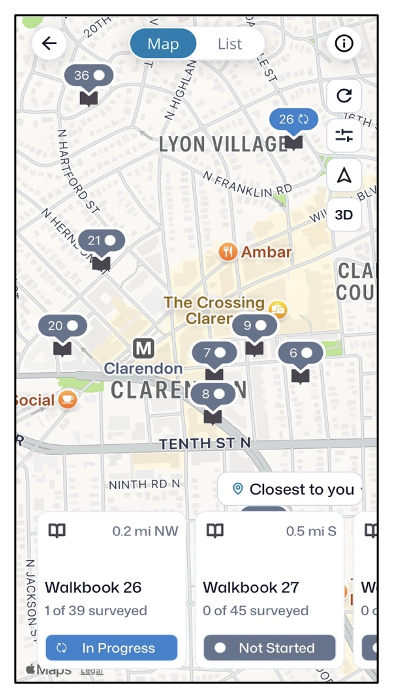
Pick a walkbook
1
Tap Start
2
A map shows your walkbooks. Each one is 50 houses near each other.
3
Tap one to open it
Gray = not started
Blue = in progress
Finished walkbooks disappear from the map.
Mike Minogue for Governor · Door Knocking Training
Part 3 · Knock doors
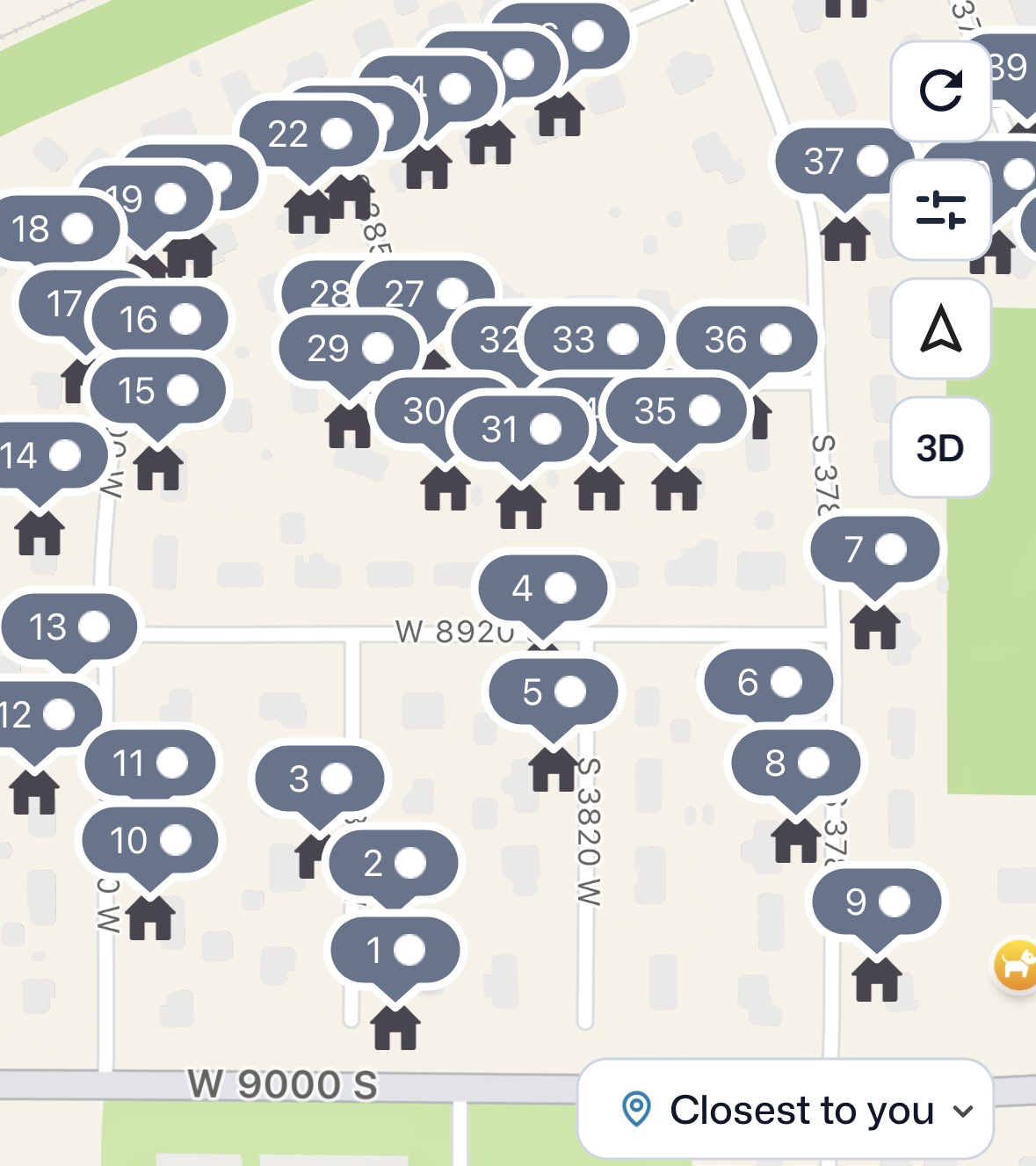
Follow the numbers
1
Each house has a number
2
The numbers are the best walking order: 1, then 2, then 3…
3
Tap a house to open it
4
See a building icon? It's apartments. Tap it to see every unit.
Mike Minogue for Governor · Door Knocking Training
Part 3 · Knock doors
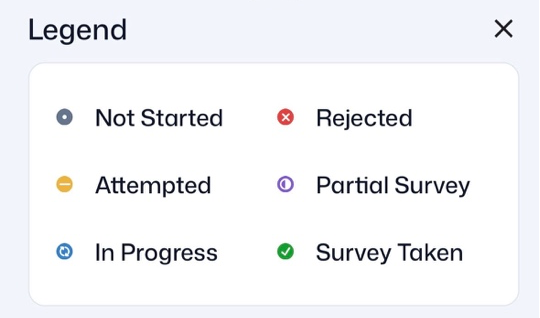
What the house icons mean
Not Started: no one has knocked yet
Attempted: knocked, but no survey yet
In Progress: survey is started
Rejected: they refused
Partial Survey: survey started, not finished
Survey Taken: done!
Forget what an icon means? Tap the ⓘ in the top-right corner of the map.
Mike Minogue for Governor · Door Knocking Training
Part 3 · Knock doors
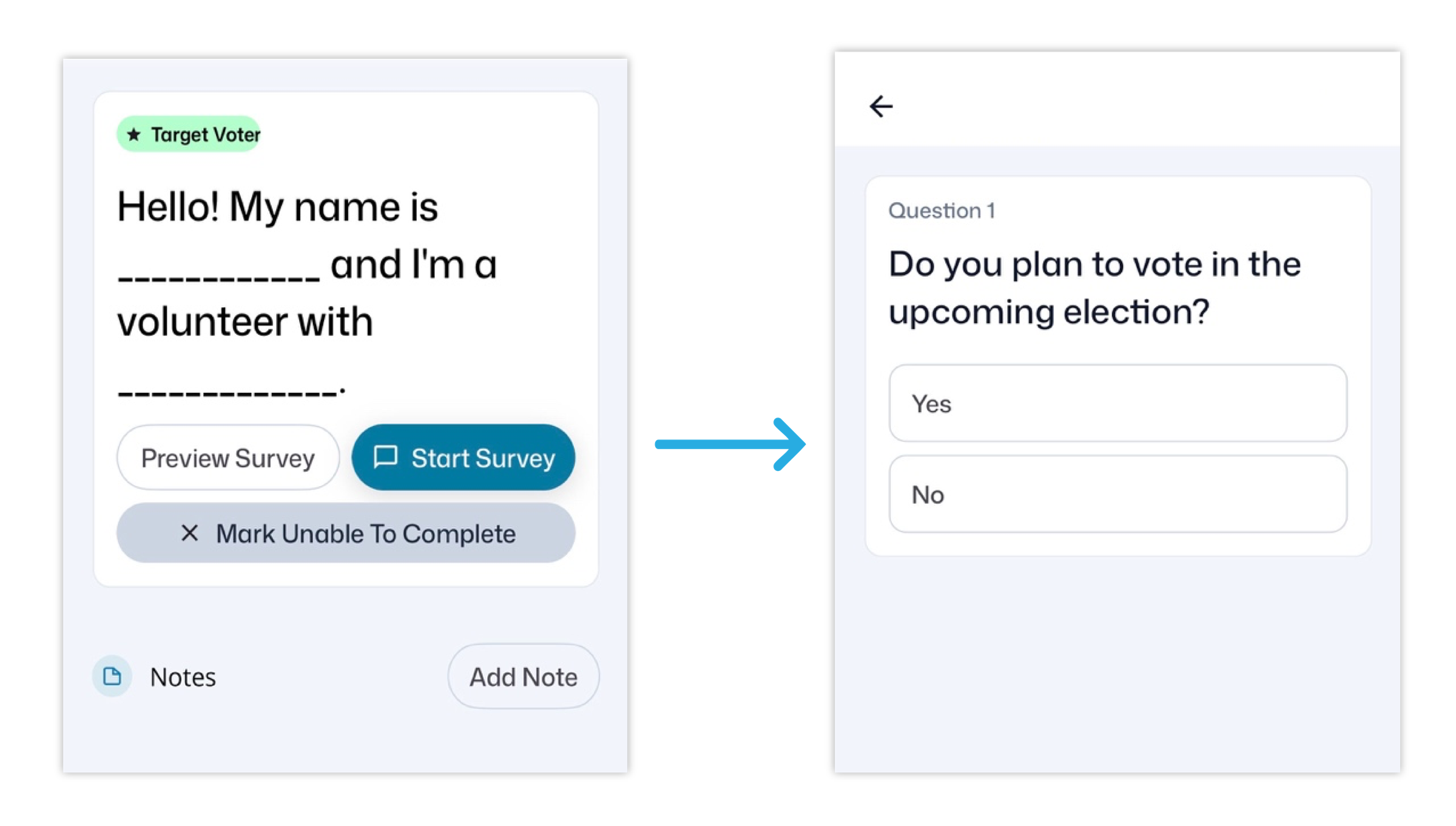
At the door
1
Say hi and ask their name
2
Find that name in the house list and tap it
3
Tap Start Survey, read the script, tap their answers
4
Tap Finish Survey
Not the ★ starred person? That's fine. Anyone listed at the house can take the survey.
Mike Minogue for Governor · Door Knocking Training
Part 3 · Knock doors
The questions, in order
1
Have you heard of Mike?
2
What issue matters most to you?
3
Would you support Mike?
4
More about Mike
Only if they're undecided
5
Can we count on your vote?
6
How will you vote?
7
Want to get involved?
8
Any other questions?
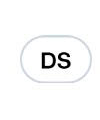
See DS? That means Dynamic Script. The app picks the right script for each voter and may skip a question or end early, so you can simply follow along on your screen.
Mike Minogue for Governor · Door Knocking Training
Part 3 · Knock doors
Question 3: where do they stand?
Strong or leaning? A clear yes with no doubt is Strong. “Probably,” “maybe,” or any hesitation is Leaning.
For Healey, or won't say (Unknown)? The survey ends there. Just thank them for their time.
Mike Minogue for Governor · Door Knocking Training
Question 5 · If they ask
When and how can they vote?
Oct 17–30
Early voting
Vote in person before Election Day
By mail
Mail-in ballot
Request one at sec.state.ma.us
Nov 3
Election Day
Tuesday, November 3
Mike Minogue for Governor · Door Knocking Training
Part 3 · Knock doors
Question 7: want to get involved?
Campaign updates
Door knocking
Yard sign
Making calls
Hosting an event
This is how we find new volunteers, so it's always worth asking! Tap each option they're interested in. They can pick more than one.
Mike Minogue for Governor · Door Knocking Training
Part 3 · Knock doors
One icon to know
Ballot Requested
They asked for a mail-in ballot but haven't turned it in yet. Remind them to turn it in!
Drop it off
By 8 PM, Tue. Nov 3
Town clerk, a ballot drop box, or an early voting site. Polling places can't accept them.
Mail it
Postmarked by Nov 3
Must arrive by Fri. Nov 6. Mail it a week early to be safe.
Mike Minogue for Governor · Door Knocking Training
Part 3 · Knock doors
Can't talk to them?
Tap Mark Unable to Complete, then pick the reason:
Not Home
Nobody answered the door
Refused
They didn't want to talk
Wrong Address
That person doesn't live there
Restricted Access
You couldn't get to the door: a locked gate or a dog
Voter passed away? Please offer your condolences, then tap Death at question 1.
Mike Minogue for Governor · Door Knocking Training
Before you go
Before you head out
Charge your phone all the way
Close your other apps
Turn your screen brightness down
Enter answers at the door, not later
Mike Minogue for Governor · Door Knocking Training
Before you go
Bad cell signal? Use Airplane Mode
1
Where you have signal, open your walkbook and wait for every house to load
2
Turn on Airplane Mode
3
Knock doors as usual
4
Back in signal, turn Airplane Mode off. Your answers upload.
Please keep the app open while in Airplane Mode. Closing it can erase your answers.
Mike Minogue for Governor · Door Knocking Training
Before you go
Door-knocking tips
Go in pairs
Bring a buddy and stay in sight of each other.
Knock 10 AM–7 PM
Not too early, not too late.
Listen
Let them talk. Hear what matters to them before you move on.
Stay outside
Please don't go inside anyone's home.
Trust your gut
If something doesn't feel right, it's okay to move on. Your safety comes first.
Mike Minogue for Governor · Door Knocking Training
Remember
Five things to remember
1
Contact your RPD for your login and town
2
Follow the numbers on the map
3
Ask their name, then tap it in the app
4
Read the script as written
5
Keep the app open in Airplane Mode
Mike Minogue for Governor · Door Knocking Training
Part 4 · Get help
Your RPD is your go-to person
Your login
Account set-up and your town assignment
Where to knock
Which walkbooks and neighborhoods to cover
Questions from the field
Something came up at a door? Ask your RPD.
When to knock
Shifts, events, and canvass days near you
Mike Minogue for Governor · Door Knocking Training
Part 4 · Get help
Find your RPD
Your Regional Political Director (RPD) is your go-to for your login, your town, and where to knock.
| Region | RPD | Phone | |
|---|---|---|---|
| Western MA | Nathan Remillard | 413-284-7458 | nremillard@minogueforma.com |
| Central MA & Suffolk County | David Buckley | 617-283-7755 | dbuckley@minogueforma.com |
| Bristol, Plymouth & the Cape | Ronan Connolly | 508-654-3389 | rconnolly@minogueforma.com |
| North Shore | Nicky Miceli | 508-314-9647 | nickymiceli16@outlook.com |
| MetroWest & Norfolk County | Andrew Zemotel | 781-924-9843 | azemotel@minogueforma.com |
Can’t reach your RPD? Contact our Political Director, Ronan Connolly · 508-654-3389 · rconnolly@minogueforma.com
You can also reach Alyssa Mulroy, Data Director · 540-905-2558 · amulroy@minogueforma.com
Mike Minogue for Governor · Door Knocking Training